Live Wallpapers, 4K Wallpapers
HD Pro WallsPersonalization
4.42.42K Reviews
- Version
- 6.1
- Installs
- 10.00M
- Age Rating
- Everyone
Screenshots
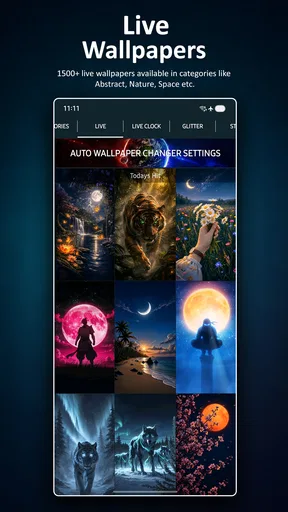
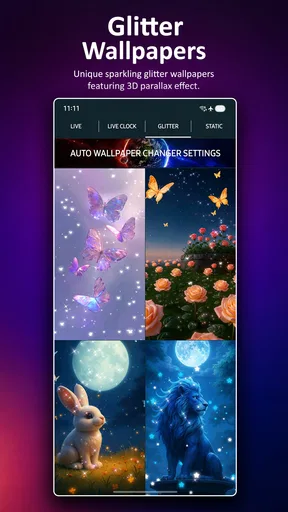
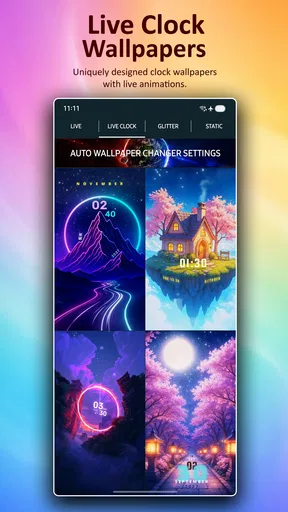
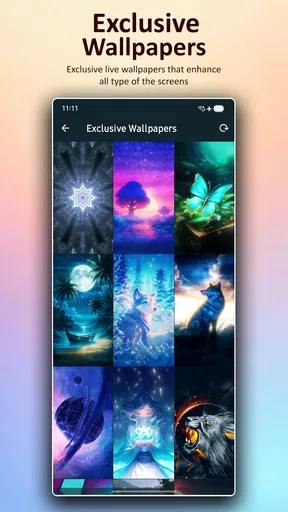

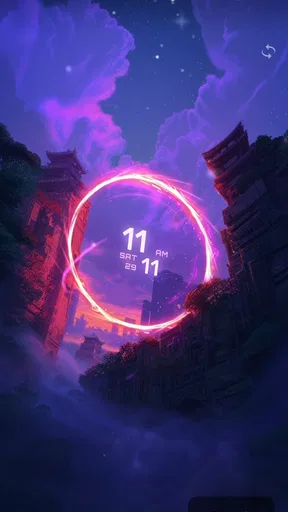

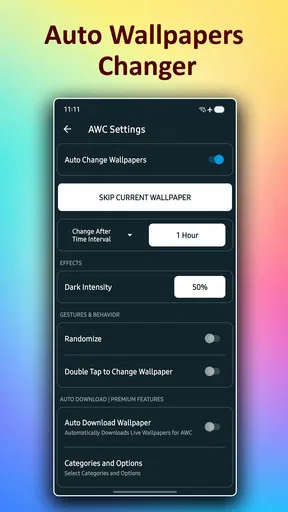
Our Review of Live Wallpapers, 4K Wallpapers
 Analysis by Appyee
If there's one thing that can instantly spice up your smartphone experience, it's a killer wallpaper. And let me tell you, the Live Wallpapers, 4K Wallpapers app is a game-changer in the world of digital aesthetics. Trust me, I've been fiddling around with this app for a while, and it’s safe to say it’s a visual delight for anyone looking to give their phone a facelift.
Who will get the most from it
I’d point this app toward someone who enjoys changing the look of a phone often but doesn’t want to assemble a collection of images by hand. The combination of still artwork and moving backgrounds makes it useful for different moods: a quiet, uncluttered image can suit a workday, while a more animated choice can make a personal home screen feel distinctive. If you rarely change your wallpaper and prefer a plain background, though, a lightweight built-in wallpaper picker may be all you need.
A practical way to use a large wallpaper library is to choose for the screen you actually look at most. I’d start with a subdued static image if I rely on small app icons and widgets, then try a live option on a less busy screen. Strong detail can look beautiful by itself but compete with icons, text, and notification badges. A preview is helpful here: check whether the important parts of the image remain visible around your everyday layout, rather than judging it only as a full-screen picture.
Choosing between still and moving backgrounds
The main decision is not simply whether a wallpaper looks impressive; it’s whether it remains comfortable after you see it dozens of times a day. A 4K image can make fine textures and scenic details stand out, but that level of detail is not automatically an advantage on every display or with every icon arrangement. I’d use a calmer image where I need quick visual access to apps, and reserve a striking scene for a screen that has more open space.
Live backgrounds bring more personality, but they are a trade-off rather than a universal upgrade. Motion may draw the eye when I unlock the phone, yet a static image is usually the more sensible choice for someone who values a still, distraction-free screen. If battery use matters to you, try the animated option during ordinary use and compare how the phone feels over your normal day before making it your permanent choice. The earlier impression that animations felt efficient is encouraging, but it should not be treated as a guarantee for every device or setting.
A useful everyday routine
Imagine choosing a wallpaper on Sunday evening before a busy week. I’d preview a quiet design against the home screen, check that the icons remain easy to distinguish, and set a livelier image only if it does not make that screen feel crowded. Later, when the week changes or the phone starts to feel visually stale, the app gives me a reason to browse again without having to hunt through unrelated image folders. The point is to make a small refresh intentional, not to keep changing backgrounds just because a large library is available.
Auto-changing backgrounds can be appealing if you like variety without making a new manual choice each time. The useful question is whether you want your screen to change on its own or prefer to keep a carefully chosen image in place. For a work device, consistency may be easier to live with; for a personal phone, rotation can make the screen feel fresh. I’d first settle on images that work well with the layout, then use automatic changes only if that variety adds something rather than becoming visual noise.
First Impressions and Ease of Use
When I first opened the Live Wallpapers, 4K Wallpapers app, I was greeted with a user-friendly interface that felt like a warm welcome. The layout is clean, making it super easy to navigate through the plethora of options available. Whether you're a tech-savvy guru or just someone who loves pretty pictures, this app caters to all. The categories are neatly organized, so you can dive right into whatever theme tickles your fancy—be it nature, abstract, or something a bit out-of-the-box.
Explore the World of 4K
Alright, let’s talk quality. The app boasts an impressive collection of 4K wallpapers that are nothing short of stunning. Each image is crisp and vibrant, capturing even the tiniest details. You can practically feel the ocean waves crashing on your screen or imagine the rustling leaves in a serene forest scene. It’s like having a little slice of paradise right at your fingertips.
For those who love to keep things dynamic, the live wallpapers feature is a real treat. The animations are smooth and don’t drain your battery as much as I initially feared. The app developers have clearly put in the effort to ensure these dynamic backgrounds run efficiently without turning your phone into a hand warmer.
Customization Options Galore
One of the standout features of this app is the level of customization it offers. You can tweak and tailor wallpapers to fit your personal style. Feel like adding a little more color? Go ahead! Want to adjust the speed of your live wallpaper animation? There’s a setting for that. It’s all about making your device truly yours, and this app nails it.
It’s worth being selective about what “customization” means for your daily setup. I’d treat any adjustments as a way to make a particular wallpaper more comfortable, rather than assuming every image needs editing. If an animation seems too busy, a slower setting—where available—could make it easier to live with; if the screen feels crowded, changing the wallpaper may be more effective than trying to tune it. Small choices like these matter because the background sits behind the parts of the phone you use most.
Seamless Integration and Performance
I’ve used a fair share of wallpaper apps, and one thing that often bugs me is the lag and glitches. Thankfully, the Live Wallpapers, 4K Wallpapers app runs smoothly, like butter on a warm toast. It integrates seamlessly with both Android and iOS, ensuring that you can switch between different wallpapers without any hiccups.
The app also provides a handy preview feature, so you can see how your chosen wallpaper looks on your home screen and lock screen before you commit. It's these little touches that make the user experience feel polished and thoughtful.
That preview is most useful when I check more than the image itself. I look at whether a bright patch sits beneath the clock, whether dark areas make icons hard to see, and whether a moving element would distract me when I unlock the screen. This quick check can save the annoyance of applying a wallpaper, rearranging the screen around it, and then deciding it does not work after all. If I’m choosing a background for both lock and home screens, I also consider that the same image may feel different once icons and widgets cover parts of it.
How it compares with simpler alternatives
Compared with choosing a photo already saved on the phone, this app’s appeal is having a dedicated place to browse still and animated designs rather than relying only on personal pictures. A built-in wallpaper selector may be quicker if all you want is a basic background and minimal extra choice. A single-purpose live wallpaper may suit someone who already knows exactly what moving scene they want. I see this app as a better fit for people who want to explore different looks, while the simpler options win for anyone who values speed, restraint, or a specific image they already own.
There is a cost consideration too. The app is free to download, while in-app purchases range from $4.99 to $34.90 per item. I’d browse and try the experience before paying for anything, and decide whether a particular paid item is worth it to me rather than assuming every useful wallpaper requires a purchase. The free starting point makes experimentation easier, but people who want to avoid in-app spending entirely should keep that distinction in mind.
Regular Updates and Fresh Content
If you’re someone who loves keeping things fresh, you’ll be pleased to know that the app is regularly updated with new content. The developers seem dedicated to bringing the latest and greatest in wallpaper trends, so you’re never left with yesterday’s news. This commitment to freshness is a big plus in my book.
The app is developed by HD Pro Walls, and its current version is 5.6.1. It first appeared on June 29, 2019, so it has been around long enough to build a sizeable audience: it has more than five million installs and an average rating of 4.5 from around 47,000 ratings, alongside roughly 2,300 written reviews. I take that as useful context for a personalization app, not proof that every collection or feature will suit my taste. The version number tells me which release I’m looking at; by itself, it does not tell me exactly what changed between releases.
For someone already using it, a newer version is most meaningful when it improves the parts they rely on: browsing, previews, applying a background, or finding something fresh. I’d update through the normal app store route and then check that my chosen wallpaper still looks and behaves as expected. That’s a practical habit with any personalization tool, especially when the screen’s appearance matters to how I use the phone each day. If an older device feels less responsive after changing to an animated background, switching back to a still image is an easy way to see whether motion is the source of the difference.
Where I’d be cautious
The biggest limitation for me is that an extensive visual choice can become its own chore. Browsing is enjoyable when I have a clear mood or theme in mind; it is less useful when I just want one appropriate image quickly. I’d narrow the choice before browsing—perhaps a calm scene, a bold color, or something suited to a particular screen—then preview a few candidates instead of trying to inspect everything. This keeps a wallpaper app from turning a quick refresh into a long scroll.
I’d also skip live backgrounds if I’m especially sensitive to motion, want the simplest possible phone setup, or need a static image that never changes. And while the app is listed for Everyone and is available on Android devices running version 6.0 or later, a person should still choose backgrounds that feel comfortable and appropriate for their own use. The broad appeal is variety, not a promise that every visual style suits every person.
Final Thoughts
So, is the Live Wallpapers, 4K Wallpapers app worth your time and phone storage? Absolutely. It’s not just about slapping a pretty picture on your screen; it’s about enhancing your everyday experience with art that moves and inspires. Whether you’re after a serene backdrop to soothe your eyes or a vibrant scene to inject some energy into your day, this app has got you covered.
I’d recommend it to someone who enjoys personalizing a phone and wants both detailed still images and animated options in one place. I’d steer a minimalist, a person who never changes backgrounds, or anyone who wants only one known image toward the phone’s built-in wallpaper controls instead. The deciding test is simple: if browsing and refreshing your screen sounds enjoyable, this app has a clear purpose; if it sounds like extra work, a basic picker is likely the better match.
Ready to transform your phone into a canvas of beauty? You can find the download links for both Android and iOS on our site. Dive in and let your imagination run wild!
Verdict
Strengths of Live Wallpapers, 4K Wallpapers
- Stunning 4K resolution enhances visual appeal.
- Wide variety of wallpapers to suit all tastes.
- User-friendly interface makes navigation easy.
- Regular updates bring fresh content frequently.
- Minimal battery consumption for live wallpapers.
Limitations of Live Wallpapers, 4K Wallpapers
- Ads can be intrusive during usage.
- Limited customization options for some wallpapers.
- Requires internet for downloading new wallpapers.
- Some wallpapers may not fit all screen sizes.
- Premium features locked behind a paywall.
Similar Picks in This Category
View All
Microsoft SwiftKey AI Keyboard
SwiftKey4.3

Wallpapers
Google LLC4.1

Zedge™ Wallpapers & Ringtones
Zedge4.7

Yandex Browser with Alice AI
Direct Cursus Computer Systems Trading LLC4.3

Ringtone Maker:create ringtone
Big Bang Inc.4.7

Fonts Keyboard
Fonts Keyboard3.9
Frequently Asked Questions
What types of wallpapers are available in the Live Wallpapers, 4K Wallpapers app?
The Live Wallpapers, 4K Wallpapers app offers a wide selection of both static and dynamic wallpapers. Users can choose from various categories, including nature, abstract, animals, and more. The app provides 4K quality wallpapers to ensure high-resolution images that enhance the visual appeal of your device.
Is the Live Wallpapers, 4K Wallpapers app free to use?
While the app offers a free version with access to a substantial library of wallpapers, there may be premium options available. These premium features could include ad-free usage, exclusive access to certain wallpapers, or early access to new content. Always check the app’s store page for detailed pricing information.
How does the app impact battery life on my device?
Live wallpapers can consume more battery than static ones because they require constant processing power to animate. The app is designed to optimize battery usage, but users may notice a slight increase in battery consumption when using live wallpapers, especially if the animations are complex or bright.
Can I use my own images as wallpapers within the app?
Yes, many wallpaper apps, including Live Wallpapers, 4K Wallpapers, allow users to upload their own images to use as wallpapers. This feature provides a personalized touch, letting you customize your device with images that are meaningful to you. Be sure to check the app settings for options to upload and set personal images.
Is the app compatible with all Android and iOS devices?
The Live Wallpapers, 4K Wallpapers app is designed to be compatible with most Android and iOS devices. However, compatibility can vary based on the device model and operating system version. It's always a good idea to check the app's requirements on the app store page to ensure it will work smoothly on your device.
